Performance issues with specific Apps can only be resolved by the respective App Developer.
If you haven't done so already, ensure that you have updated to the most recent version of iPad. At the time of writing, iPadOS 26.7.2 and iPadOS 27.2 are current. If your iPad is not operating as expected, try a forced-restart - as this may clear many post-update issues:
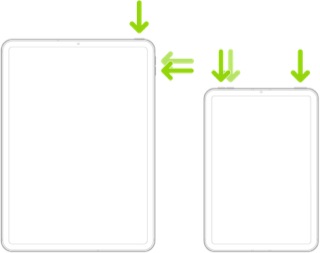
Force restart iPad (models with Face ID or with Touch ID in the top button)
If your iPad doesn’t have the Home button, do the following:
- Press and quickly release the volume button nearest to the top button.
- Press and quickly release the volume button farthest from the top button.
- Press and hold the top button.
- When the Apple logo appears, release the top button.
 User level: Level 1 (5 points)